Now Reading: Sharp MX-M565 F2-22 Error – Causes and How to Fix It
-
01
Sharp MX-M565 F2-22 Error – Causes and How to Fix It

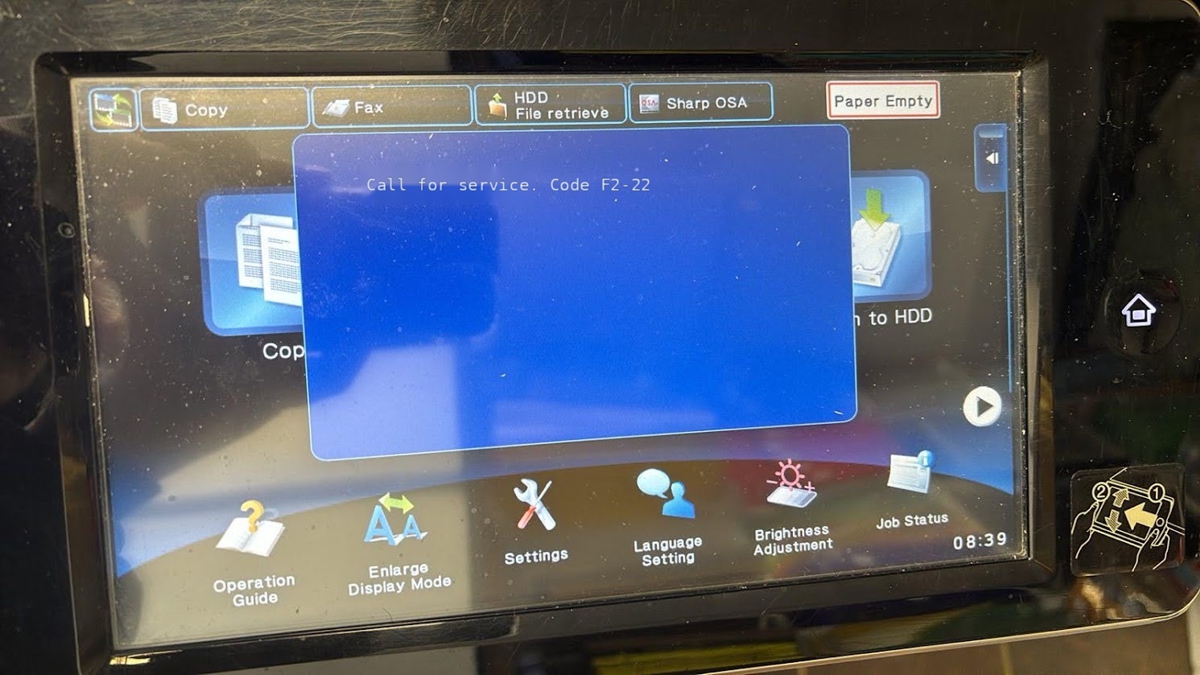
Sharp MX-M565 F2-22 Error – Causes and How to Fix It
If your Sharp MX-M565 shows the F2-22 error, the machine has detected a discharge lamp (K) problem – not a toner, paper, or fuser fault. On the MX-M565 (and the closely related MX-M565N / MX-M565FN), the Sharp MX-M565 F2-22 error is triggered when the discharge lamp’s open sensor stays open for roughly one second after the lamp is switched on, so the copier stops to protect the imaging process. This guide explains what the error really means, the most likely causes, the safe checks you can run first, and the service-level fix – step by step.
What the Sharp MX-M565 F2-22 error means
The discharge lamp (also called the erase lamp or discharge LED) neutralizes the residual charge left on the drum after each rotation, so the next image starts on a clean, evenly discharged surface. The K in this code simply means the black imaging station – and on a mono machine like the MX-M565 that’s the only station there is.
F2-22 is a hardware/detection fault: the engine turns the discharge lamp on, but the discharge-lamp open sensor reports the circuit as open for about one second, so the machine flags a fault and locks out. In plain terms, the copier can’t confirm the discharge lamp is actually working. That points at the lamp board, its wiring, or the main engine board – not at a consumable.
Common causes of F2-22 on the Sharp MX-M565
- Loose or broken connection between the discharge lamp PWB (K) and the PCU PWB (the main engine board) – often a harness knocked slightly loose during a toner change, drum swap, or PM.
- A faulty discharge lamp PWB (K) – the small board that drives the erase lamp.
- A faulty PCU PWB – the engine control board the lamp reports to.
Applies to / What you’ll need
Applies to: Sharp MX-M565, MX-M565N, MX-M565FN – and, because they share the same mono engine and F2-2x discharge-lamp design, close relatives such as the MX-M364N, MX-M465N and MX-M564N (all use the same K-only discharge-lamp logic).
What you’ll need:
- Phillips screwdriver
- Access to Simulation (service) mode
- The model’s service manual (for board locations and adjustments)
- A replacement discharge lamp PWB (K), only if testing points to it
Note: Steps 1–2 are safe for any user. Steps 3–6 involve service mode and board replacement and are best done by a Sharp-trained technician.
How to fix the F2-22 error step by step
- Power the machine off and on properly. Switch off at the main power switch, wait 30–60 seconds, then restart. This clears a one-off / transient detection and is always worth doing first.
- Check for a loose connection. Power off, open the front, and – if F2-22 appeared right after a toner change, drum/developer swap, or service – make sure the discharge-lamp harness and its connector at the engine board are fully seated. Don’t force anything; a partly seated harness is one of the most common triggers.
- Test the discharge lamp in service mode. Enter Simulation (service) mode and run
SIM 5-4(discharge-lamp operation check). On MX-series machines this lights the discharge lamp for about 30 seconds – watch that the lamp actually lights. If it doesn’t, the lamp board or its harness is the fault. - Reseat, then replace the discharge lamp PWB (K). If the wiring looks good but the code persists, the discharge lamp PWB (K) is the most likely failed part. Reseat it first; if F2-22 stays, replace it and re-test.
- Replace the PCU PWB. If a known-good discharge lamp board and harness don’t clear the code, the PCU PWB is the remaining cause. When you swap this board, follow Sharp’s procedure for the on-board EEPROM and adjustments – Sharp engines keep settings on the SCU/PCU/MFP EEPROMs, so transfer/handle them per the manual rather than fitting a blank board.
- Clear the code and confirm Ready. After the repair, clear the trouble via service mode (or per the manual) and confirm the machine returns to Ready and prints normally.
Troubleshooting notes
- Don’t just replace the toner. F2-22 is not a toner-supply code – those are F2-64 (toner supply, black) and F2-02 (toner supply abnormality). Swapping toner will not clear F2-22.
- If it appeared right after a PM or drum/developer swap, suspect a knocked or half-seated harness before ordering any parts.
- Seeing F2-23, F2-24 or F2-25 instead? Those are the C/M/Y discharge-lamp versions on color machines; on the mono MX-M565 only F2-22 (K) applies, but the diagnosis is identical per color.
FAQ
Is the Sharp MX-M565 F2-22 error a toner problem? No. It’s a discharge lamp (K) fault. Toner errors on this machine are F2-64 or F2-02, and they behave differently.
Can I fix F2-22 myself? You can safely power-cycle the machine and check for a loose connection after a recent service. Beyond that, it needs service mode and usually a board swap, so it’s a technician job.
Which part actually fixes F2-22? Most often the discharge lamp PWB (K). If a known-good lamp board and harness don’t clear it, the PCU PWB.
What does the discharge lamp do? It removes the leftover charge on the drum after each rotation so the next image starts on a clean surface. If the machine can’t confirm it’s working, it stops with F2-22.
Related guides & next steps
Fixed it? Keep your MX-M565 healthy and learn the neighbouring procedures:
- [How to enter Sharp service (Simulation) mode] – needed for the SIM 5-4 test above.
- [Sharp F2-64 toner supply error – causes and fix] – the toner code F2-22 is often mistaken for.
- [Sharp MX-M series drum & developer replacement guide] – the PM work that most often disturbs the discharge-lamp harness.
- [All Sharp F2 error codes explained] – quick reference hub.
- Browse more in Error Code & Troubleshooting.
Prefer to watch? Subscribe to the Print Copy Fix channel on YouTube for step-by-step Sharp repair videos.