

Now Reading: Enable USB port on Sharp MX-B350P, AR-B352PT, MX-B450P, AR-B452PT
1
-
01
Enable USB port on Sharp MX-B350P, AR-B352PT, MX-B450P, AR-B452PT

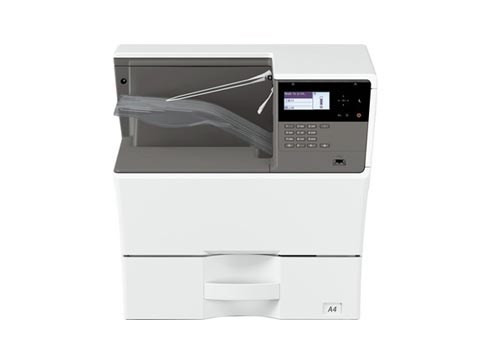
Enable USB port on Sharp MX-B350P, AR-B352PT, MX-B450P, AR-B452PT
By default the USB port is disabled on these Sharp models. To enable the USB port on the Sharp MX-B350P, AR-B352PT, MX-B450P and AR-B452PT, you enter simulation mode and switch it on. Here are the exact steps.
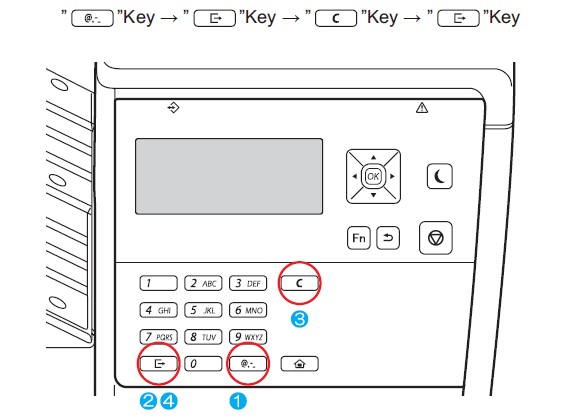
How to enable the USB port on the Sharp MX-B350P / MX-B450P
- Enter simulation mode on the machine.
- Go to SIM 26-50 (press 26, OK, then 50, OK).
- Use the down arrow to select “G: USB DEVICE”.
- Press 1, then press OK.
- Press the Home button to exit. The USB port is now enabled.
Watch the video
You can watch the full procedure here:
Frequently asked questions
Why is the USB port disabled by default?
Sharp ships several MX-B and AR-B models with the USB host port turned off. You must enable it in simulation mode before you can print from a USB cable or drive.
What is simulation (SIM) mode?
Simulation mode is a service menu used to change machine settings such as ports, counters and adjustments.
Which models does this cover?
The MX-B350P, AR-B352PT, MX-B450P and AR-B452PT use the same SIM 26-50 procedure.
Related guides
Leave a reply
You must be logged in to post a comment.
Related Posts
Previous Post
Next Post
Previous Post
Next Post
Loading Next Post...
Pingback: Enable USB port on SHARP BP-50C26 | Copiers Printers Tricks
Pingback: Enable USB port on SHARP BP-50C26 - PrintFixLab