

Now Reading: Fix “Cartridge Error – Put the Toner Cartridge Back In” on Brother DCP-1510/1512
-
01
Fix “Cartridge Error – Put the Toner Cartridge Back In” on Brother DCP-1510/1512

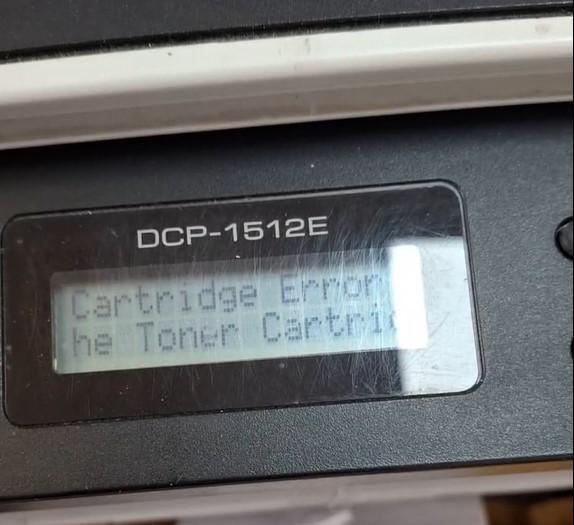
Fix “Cartridge Error – Put the Toner Cartridge Back In” on Brother DCP-1510/1512
If your Brother DCP-1510 or DCP-1512 shows “Cartridge Error. Put the Toner Cartridge back in” after fitting a new toner, the machine has not detected the new cartridge. This guide clears the error and manually resets the toner, just like a normal cartridge replacement.
First, reseat the toner cartridge
Reinstall the toner cartridge into the drum unit. Shake the cartridge gently side to side first, and make sure it clicks fully into place. If the message is still showing, do the manual reset below.
Manual toner reset procedure
- Press Menu, then press ▲ or ▼ to display Machine Info and press OK.
- Press ▲ or ▼ to display Reset Drum.
- Press and hold OK until 1. Reset 2. Exit is displayed.
- Press the Start button — all displays on the LCD clear.
- Press ▲ or ▼ to display the value for your toner type, then press OK:
- Starter toner: 10
- Standard toner: 11
- “Accepted” appears on the LCD and the toner is reset.
Frequently asked questions
Why does the DCP-1510/1512 show a cartridge error after a new toner?
The machine sometimes fails to detect a new or third-party cartridge. Reseating it and running the manual reset above tells the printer a full cartridge is installed.
Which value do I enter, 10 or 11?
Enter 10 for a starter toner and 11 for a standard toner cartridge.
Does this reset the drum too?
No. This procedure resets only the toner. For a drum warning, use the drum reset guide below.
Related guides
Leave a reply
You must be logged in to post a comment.
Pingback: Secret procedure to reset "Change the toner cartridge" or "Install toner" on BROTHER DCP-L5500DN / L5850DW | Copiers Printers Tricks
Pingback: Secret procedure to reset "Change the toner cartridge" or "Install toner" on BROTHER DCP-L5500DN / L5850DW | Print Copy Tech
Pingback: Secret procedure to reset "Change the toner cartridge" or "Install toner" on BROTHER DCP-L5500DN / L5850DW - PrintFixLab