

Now Reading: Scan to PDF – NAPS2 – Free Download
-
01
Scan to PDF – NAPS2 – Free Download

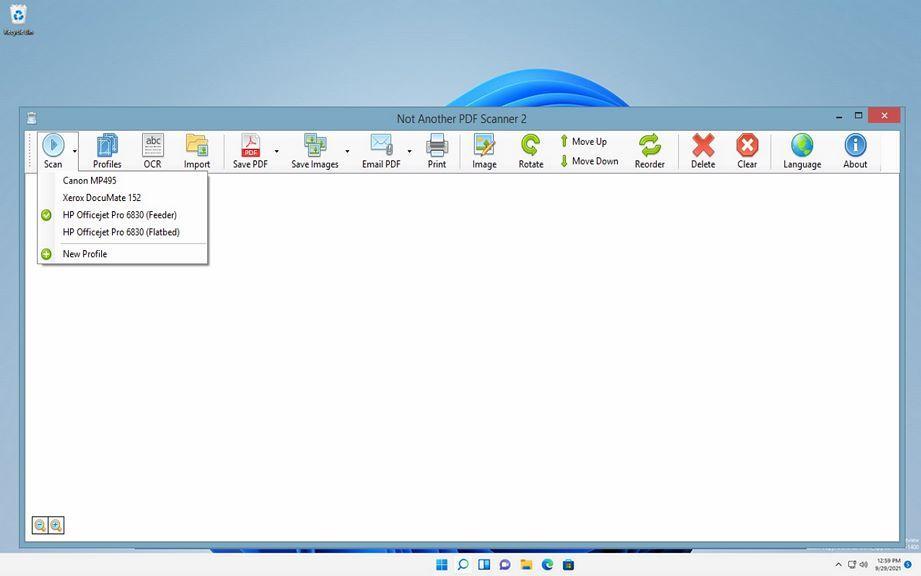
Scan to PDF – NAPS2 – Free Download
NAPS2 is a document scanning application with a focus on simplicity and ease of use. Scan your documents from WIA- and TWAIN-compatible scanners, organize the pages as you like, and save them as PDF, TIFF, JPEG, PNG, and other file formats. Available on Windows, Mac, and Linux. Scan with a single click Easily scan with your chosen settings, or set up multiple profiles for different devices and configurations. Once you’ve finished scanning, you can save, email, or print with only a couple clicks. Save to PDF, TIFF, JPEG, PNG, or other file types. Compatible with both WIA and TWAIN Choose the driver that works best with your scanner, as well as settings like DPI, page size, and bit depth. Scan from a glass flatbed or an automatic document feeder (ADF), including duplex support. Rotate, crop, and rearrange scanned images Order your pages however you like, including tools to interleave duplexed pages. Easily rotate your pages at right angles, or straighten them at any angle you like. Use image editing tools to crop or change brightness and contrast. Identify text using OCR Search through text included in your PDFs by using optical character recognition (OCR), in any of over 100 languages.
FREE DOWNLOAD
Leave a reply
You must be logged in to post a comment.
Pingback: Complete Guide to Public Transport in Skopje 2025 | Buses, Cable Car & Tips - Visit Skopje
Pingback: Complete Guide for Skopje Public Transportat in 2025 | Buses, Taxis, Bikes & More | Visit Skopje